Human Asset Development
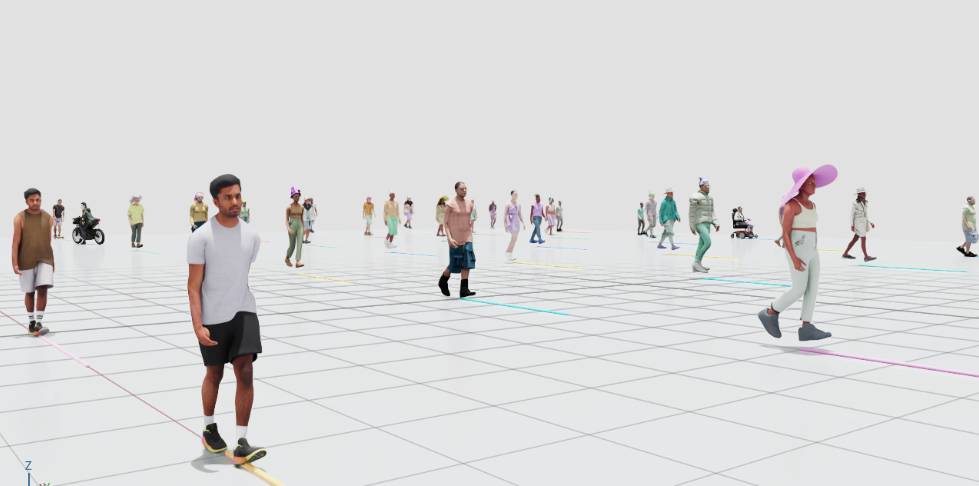
The EAI human system combines a registry, a USD stage runtime, and one unified validation tool. The current manifest contains 44 enabled actors: 39 skeletal actors support 12 standard actions, four non-skeletal activity actors can move along paths, and one non-skeletal actor is static. Human actors use their own stage runtime and are not Env DIY robots or entries in the traditional controller catalog.
Skeletal pose writes use CPU PhysX on Isaac Sim 5.1. Workflows containing animated humans must not force GPU PhysX; rendering can still use a CUDA GPU.
Code and data boundaries
Path |
Responsibility |
|---|---|
|
Authoritative actor, motion, capability, and placement catalog |
|
Strict JSON schema for the manifest |
|
Provider revision and checksums for the characters, activities, and motions packs |
|
Manifest loading, path confinement, and capability validation |
|
Spawning, path following, action playback, pause, and resume behavior |
|
Asset orientation, scale, and automatic grounding |
|
Unified GUI and headless validation for every actor |
Runtime characters, textures, motion sources, and retarget caches must be
installed below usd/human/. Every manifest usd_path is relative to that
root. Conversion tools may read an approved external source directory, but the
generated runtime catalog must not depend on a developer home directory or any
absolute path outside the repository asset root.
Large payloads can be distributed through the gated Hugging Face provider. The
source repository maintains the manifest, schema, audit records, and pack
checksum metadata. The provider supplies matching characters/, activities/,
and motions/ contents.
Download the complete payload
The large Human USD files, textures, motions, and retarget caches are hosted in
the gated Hugging Face dataset
rosolab/eai-simulator-assets.
Request access on that page and wait for approval. Then authenticate and run the
single complete download from the Git repository root:
hf auth login
hf download rosolab/eai-simulator-assets \
  --type dataset \
  --revision v0.1.0-beta.1 \
  --include "usd/human/**" \
  --local-dir .
The command pins the immutable tag recorded by pack-checksums.json and
preserves the provider paths, so the download fills the repository’s
usd/human/ tree directly. Human runtime assets are distributed only as this
complete payload; there are no per-actor, per-action, or per-pack download
commands. After it completes, run the unified GUI or headless validation later
on this page.
Actor capabilities
Each asset record declares its capabilities explicitly. Callers must not infer behavior from directory names:
articulatedandcan_play_actionsstate whether an actor has a skeleton and can play standard actions.path_followingstates whether the actor can move along waypoints.animation_profileidentifies a skeleton profile such assynbody_55,smplx_70,rpm_87, orrigid_1.motionslists the action IDs available to the actor.content_up_axis,yaw_offset, andscalenormalize source coordinates and visible facing.ground_offsetadds an intentional clearance to the automatic grounding result.
Placement preserves transforms authored on the referenced USD root, then applies the manifest orientation, scale, and height corrections. For skinned actors, the grounding range comes from visible mesh points after deformation by the current UsdSkel pose. Non-skinned meshes, or content whose skinning cannot be evaluated, use USD bounds as a fallback. Actors are regrounded when they are spawned, when actions change, and when locomotion resumes after an action.
Standard actions
All 39 skeletal actors share the same number mapping:
Number |
Action ID |
Default path policy |
|---|---|---|
1 |
|
|
2 |
|
|
3 |
|
|
4 |
|
|
5 |
|
|
6 |
|
|
7 |
|
|
8 |
|
|
9 |
|
|
10 |
|
|
11 |
|
|
12 |
|
|
path_policy=pause pauses path following for the duration of an action.
path_policy=continue combines skeletal animation with scene translation.
facing_yaw_offset aligns visible action facing with the path tangent without
modifying the skeleton root joint. root_motion=in_place removes horizontal
skeleton-root translation and leaves scene movement to path following.
Cross-profile playback uses retarget caches and semantic joint aliases. A new skeletal actor needs caches for all 12 standard actions. Its manifest skeleton signature, motion content hashes, and cache metadata must remain consistent.
Integrating the stage runtime
The following minimal structure assumes a Z-up, meter-scale USD stage and an installed human payload:
from pathlib import Path

from EAI_assets import asset_resolver
from EAI_assets.humans import (
    HumanActorConfig,
    HumanAssetRegistry,
    UsdHumanStageRuntime,
)

human_root = Path(asset_resolver.asset_path("human")).resolve()
registry = HumanAssetRegistry.load(
    human_root / "manifest.json",
    asset_root=human_root,
)
runtime = UsdHumanStageRuntime(
    stage,
    registry,
    cache_root=human_root / "motions/cache",
)

runtime.spawn(
    HumanActorConfig(
        actor_id="human-1",
        asset_id="synbody-0000001",
        prim_path="/World/Humans/human_1",
        initial_pose=(0.0, 0.0, 0.0, 0.0),
        waypoints=((0.0, 0.0, 0.0), (3.0, 0.0, 0.0)),
        speed=1.2,
        loop=True,
    )
)
runtime.play_action("human-1", "phone_call")

# Call from the simulation loop.
runtime.update(dt)

# Release adapters, actors, and pause leases before closing the stage.
runtime.close()
Every actor needs a unique actor_id and an absolute USD prim_path. At least
two waypoints enable path mode; an actor without waypoints uses external
movement mode. An action affects only the selected actor’s animation and path
pause state.
UsdHumanStageRuntime.update(dt, *, context=None, actor_ids=None, animate_while_idle=False)
supports batched scheduled updates: passing actor_ids updates only those actors.
Unselected actors do not advance their paths, resample animation, or change their
action clocks; their events and pending reground state are preserved for later
updates, which suits rotating actors by distance, interaction state, or a per-tick
budget in large deployments. Every id in actor_ids must be registered, duplicates
are not deduplicated automatically, and callers should keep the sequence unique.
# Update only nearby or currently interacting actors.
runtime.update(dt, actor_ids=("human-1", "human-5"))

# Idle policy: the default False stops resampling animation for actors whose path
# is paused or finished and that have no active action. Pass True to restore the
# previous always-animate behavior, for example in-place locomotion.
runtime.update(dt, animate_while_idle=True)
The default animate_while_idle=False is an intentional CPU-saving policy. The
unified demo pauses every path after spawn, so idle actors stand still and only
resample animation after an action starts or their path resumes; this stillness is
not a missing animation capability. HumanMotionController.update(dt, *, actor_ids=None, locomotion_actor_ids=None) has the same semantics: actor_ids
limits which actor state machines advance, and locomotion_actor_ids only freezes
the idle locomotion clocks of excluded actors; active actions still advance.
Adding actors or actions
To add an actor:
Install redistributable character, texture, and dependency files below
usd/human/characters/orusd/human/activities/.Add a manifest record with a relative
usd_path, skeleton profile, capabilities, orientation, scale, grounding offset, provenance, and license status.For a skeletal actor, build retarget caches for all 12 standard actions and verify that action facing matches its movement semantics.
Use the unified demo to check loading, actions, movement, restoration, and grounding.
Create a local JSON keyframe draft:
python tools/human_assets/edit_action.py init \
  --action-id wave --duration 2.0 --fps 30 \
  usd/human/custom-actions/wave.json
Import one self-contained GLTF/GLB action clip:
python tools/human_assets/import_action.py usd/human/motions/sources/bow.gltf \
  --action-id bow-example --profile smplx_70 --human-root usd/human
Custom actions use an overlay manifest and must not replace any of the 12
standard action IDs. See tools/human_assets/README.md for conversion, import,
and cache-builder arguments.
Unified functional validation
GUI mode loads all 44 actors in one stage:
source "$(conda info --base)/etc/profile.d/conda.sh"
conda activate env_isaaclab
python -u tools/human_assets/run_demo.py
Press Q to select the next actor. For skeletal actors, enter 1-12 and press
Enter. The four movable rigid_1 actors accept only 1; the static actor
rejects actions. Backspace edits the input, X stops and restores the current
actor, and Esc closes the demo. Actors return to their pre-action position
after a finite action, cancellation or replacement of a looping action, actor
selection changes, and completion of rigid movement.
Headless mode uses the same backend and control state machine for the complete capability matrix:
conda run --no-capture-output -n env_isaaclab \
  python -u tools/human_assets/run_demo.py --headless
A successful run ends with:
Verified unified human matrix: 39x12 + 4 + 1
This command requires Isaac Sim 5.1 and the complete human payload. It verifies 39 x 12 skeletal actions, four rigid outbound-return movements, one static actor, animation sampling, path policies, current-pose grounding, bounds, and exact position restoration.
Provider publication
Provider publication is a separate maintainer operation after asset acceptance.
The published contents must include characters/, activities/, and motions/
matching the source manifest, with approved provenance and licenses. After
uploading to Hugging Face, create an immutable tag, update
usd/human/pack-checksums.json, and run the unified headless validation from a
clean repository root against that fixed revision. Source mappings, provider
files, the tag, and checksum metadata must belong to the same release.
Sources and Acknowledgments
Actor and motion assets are derived from
Urban-Sim (Apache-2.0) and
SynBody (CC BY-NC-SA 4.0). Per-asset provenance
and license records live in usd/human/manifest.json. Full attribution and
license texts are available here:
SynBody content is offered under CC BY-NC-SA 4.0, which does not permit
commercial use. The SynBody project page also directs users seeking commercial
SMPL-X licensing to Meshcapade at sales@meshcapade.com; users must comply
with all applicable upstream asset and model terms.